Posts

Showing posts with the label MVC (Model View Controller)

Overview of ASP.NET MVC Routing

In this tutorial, we introduce an important feature of all ASP.NET applications ASP.NET MVC Routing call. The ASP.NET routing module is responsible for assigning incoming requests particular browser MVC controller actions. At the end of this tutorial, you will understand how the standard routing table maps requests to controller actions. Using the default route table When you create a new ASP.NET MVC, the application is configured to use ASP.NET Routing. ASP.NET routing is configured in two places. First, ASP.NET routing is enabled on the file from the Web application configuration (Web.config file). There are four sections in the configuration file that are relevant for routing: the system.web section. httpModules, section system.web.httpHandlers, system.webserver.modules section and section system.webserver.handlers. Be careful not to delete these sections, because without these sections routing no longer work. Second, and most importantly, a routing table is created in the a...

Adding a Controller

Image
Adding a Controller MVC stands for  model-view-controller . MVC is a pattern for developing applications that are well architected and easy to maintain. MVC-based applications contain: Controllers: Classes that handle incoming requests to the application, retrieve model data, and then specify view templates that return a response to the client. Models: Classes that represent the data of the application and that use validation logic to enforce business rules for that data. Views: Template files that your application uses to dynamically generate HTML responses. We'll be covering all these concepts in this tutorial series and show you how to use them to build an application. Let's begin by creating a controller class. In  Solution Explorer , right-click the  Controllers  folder and then select  Add Controller . Name your new controller "HelloWorldController". Leave the default template as  Empty controller  and click Add . Notice in  Solution Exp...

ASP.NET MVC 3 Introduction

Image
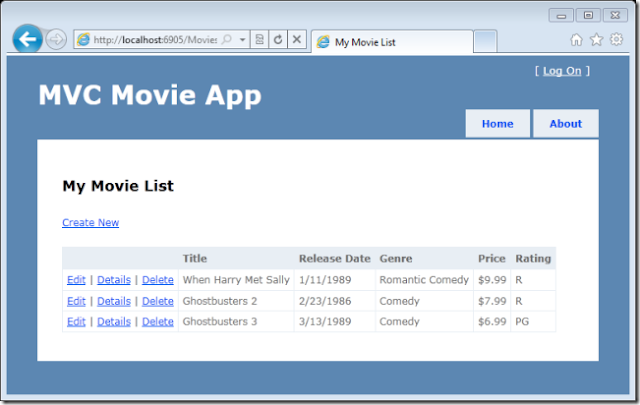
This article will explain you the basics of ASP.NET MVC 3 Web application by using Microsoft Visual Web Developer 2010 Express Service Pack 1, which is a free version of Microsoft Visual Studio 2010.  Make sure you've installed the prerequisites listed below before you start. You can install all prerequisites by clicking this link:  Web Platform Installer . OR, you can individually install the prerequisites by the following links: Visual Studio Web Developer Express SP1 prerequisites ASP.NET MVC 3 Tools Update SQL Server Compact 4.0  (runtime + tools support) If you're using Visual Studio 2010 instead of Visual Web Developer 2010, install the prerequisites by clicking the following link:  Visual Studio 2010 prerequisites . A Visual Web Developer project with C# source code is available to accompany this topic.  Download the C# version . If you prefer Visual Basic, switch to the  Visual Basic version  of this tutorial. What You'll Build You'...

Introducing MVC Development w/the Razor View Engine for Visual Studio Developers

Image
The Razor View Engine is a precise, useful, light language that enables you to create views for MVC projects in ASP.NET still while keeping a separation of concerns, ability to test, and pattern based development.  ASP.NET MVC developers looking for a more concise syntax now have another option that's built-in (of course, there are many 3rd party view engines out there) with the language being a familiar light version of C#.  The Razor View engine is used to create WebMatrix sites or Visual Studio MVC applications.  When using ASP.NET MVC with either engine, you'll stick to a style of development called "convention over configuration", meaning that you'll use certain naming conventions to name files, models, views, controllers, and other key application elements rather than storing lots of metadata about these same elements in a configuration file.  When using MVC in Visual Studio 2010, it's is setup so that you'll be guided to use convention over configu...